1) What files control user administration?
A) /etc/passwd file: 7 Fields: loginid:x:userid:groupid:comment:homedir:shell
/etc/shadow: 9 Fields: loginid:password:lastchng:min:max:warn:inactive:expire
/etc/group : 4 Fields : groupname:password:groupid:username list)
2) What does the "pwconv" command do?
A) It updates the /etc/shadow file with information from /etc/passwd file.
3) Where are the failed login attemps to system logged?
A) /var/adm/loginlog (We need to create this file as it does not exist by default)
4) Which command shows the users currently logged in to system?
A) who ( It reads the information from /var/adm/utmpx file)
5) Which command will show detailed information about a user?
A) finger –m
6) Which command displays all login and logouts?
A) last (It reads the information from /var/adm/wtmpx file)
7) What is the "StickyBit" file permission?
A) Sticky Bit permission protects the file within a public writable directory.
File set with sticky bit will not allow any user to delete the file except the
Owner of file, owner of the group or the root user.
8) How is ACL (Access Control Lists) implemented?
A) 8.1) "getfacl"command : To display an ACL on file.
Syntax : getfacl
8.2) setfacl command : To set the ACL on file
Syntax : setfacl
8.3) setfacl –m command : To modify ACL entries
Syntax : setfacl –m
8.4) setfacl –s command : Remove old ACL entries and replace with new one.
Syntax : setfacl –s
8.5) setfacl –d command : Delete ACL entry
Syntax : setfacl –d
9) Imp "root(/)" subdirectories and their purpose :
9.1) / : Root of overall file system.
9.2) /bin : Symbolic link to /usr/bin. Stores standard system commands and binary files.
9.3) /dev : Primary location for "logical" device names
9.4) /devices : Primary location for "physical" device names
9.5) /etc : Contains host specific system admin config files
9.6) /export : Default directory for commonly shared filesystems.
9.7) /home : Default directory / mount point for user's home directory
9.8) /kernel : Directory of platform independent loadable kernel file
9.9) /mnt : Temporary mount point for file systems
9.10) /opt : Default directory for add on packages
9.11) /sbin : Executables used in booting process and file recovery
9.12) /tmp : Temporary files
9.13) /usr : Mount point for /usr file system
9.14) /var : Directory for varying files, temporary logging or status files
10) What are the different disk slices?
Slice Name Function
0 / Root's system files
1 swap Swap area
2 Entire Disk
5 /opt Optional Software
6 /usr System Exe's
7 /export/home User's file and directories
11) Which command displays the system configuration information?
A) prtconf
12) Which command is used to configure newly attached hardware ?
A) devfsadm –c where
13) What are the different types of "file systems" in Solaris?
A) There are 3 Types of file system :
13.A.1) Disk based : ufs (standard unix), hsfs (cd-rom), pcfs (Floppy)
Or udf (DVD and CD Rom)
13.A.2) Distributed : NFS (enables sharing of files between many types of n/w)
13.A.3) Pseudo : tmpfs (temporary), swapfs , fdfs, procfs
14) What is a "boot block"?
A) The bootstrap program (bootblk) is found in the next 15 disk sectors. Only the "root" file system has an active boot block, although the space is allocated for boot block at the beginning of each file system.
15) What is "superblock"?
A) The file system is determined by its superblock. It is contained in the 16 disk sectors following the boot block. It contains :
· No. of data blocks
· No.of cylinder groups
· Size of data block fragment
· Description of hardware
· Name of mount point
· File system state flag ( clean , stable , active , logging or unknown)
16) How will you repair the main superblock if it gets corrupted?
A) Every file system has backup superblock at block no.32, which can be given to fsck to repair the main superblock.
# fsck –o b=32 /dev/rdsk/c0t0d0s0
17) How to create new file systems ?
A) newfs /dev/rdsk/c0t0d0s0
18) How will you restore /etc/vfstab file if it gets corrupted?
A) Step 1 : Insert Solaris CD 1 of 2
Step 2 : Go to single user mode : ok boot cdrom –s
Step 3 : Run "fsck" on /(root) partition : # fsck /dev/rdsk/c0t0d0s0
Step 4 : Mount /(root) file system on /a directory to gain access to file system
# mount /dev/dsk/c0t0d0s0 /a
Step 5 : Set & export TERM variable
# TERM=sun
# export TERM
Step 6 : Edit /etc/vfstab file and remove the incorrect entry : # vi /a/etc/vfstab
Step 7 : Unmount the file system : # cd / ; # umount /a and reboot the system.
19) How will you share user's home directory?
A) Step 1 : Login as root and verify mountd daemon is running
# ps –ef grep mountd
Step 2 : If the daemon is not running start it :
# /etc/init.d/nfs.server start
Step 3 : List all shared filesystems
# share
Step 4 : Edit the /etc/dfs/dfstab file and add :
# share –F nfs /export/home
Step 5 : Share the file systems in the /etc/dfs/dfstab file :
# shareall –F nfs
Step 6 : Verify that the home directory is shared.
# share
20) What does /etc/inittab file contain ?
A) The /etc/inittab contains the systems default run level, processes to start/monitor
or restart. It also contains the actions to be taken when run level changes.
/etc/inittab file is in foll format :- id:rstate:action:process
21) How will you use "shutdown" command?
A) # shutdown –i0 –g300 –y
22) How will you check the OBP version of your system ?
A) Use " banner" command at the ok prompt
23) Explain the Solaris Boot process?
A) 23.1 ) Boot Prom Phase : Runs POST to verify system hardware and memory Loads "bootblk" primary boot program.
23.2) Boot Program Phase : "bootblk" loads the finds "ufsboot" and loads it in memory.ufsboot loads the kernel.
23.3) Kernel Initialization Phase : Loads modules using "ufsboot"
Creates user processes and starts /sbin/init process.
23.4) Initialization Phase : Starts "rc" scripts. These scripts check & mounts file System, starts various processes and perform system maintanence tasks
24) Backup And Restore :
Full backup : # ufsdump 0uf /dev/rmt/0 /
Where 0 à indicates full backup f à Path of the backup device u à update the dumpdates file.
Restore : # ufsrestore if /dev/rmt/0
25) How to temporary disable user's login.
A) Log in as "root"
B) Create /etc/nologin file
# vi /etc/nologin
C) Include a message
D) Close and Save the file.
26) What does 'Probe' command do?
A) probe-scsi-all à list all internal and external scsi devices
B) probe-ide-all à List all ide devices
27) How to find whether a system is configured for 32-bit or 64-bit?
A) # isainfo -v
28) How to activate Ethernet card ?
A) # ifconfig qfe0 plumb
29) How will you assign ip address to system?
A) # ifconfig qfe0 192.168.0.1 netmask 255.255.255.0 up
30) How will you check current ip configuration?
A) # ifconfig –a
31) How will you set a default router ?
A) # /etc/defaultrouter
32) How to remove all current routes and assign 192.168.1.100 as default router?
A) # route flush
# route add default 192.168.1.100
33) How to change the network settings ?
A) # sys-unconfig
34) What all does the NVRAM store?
A) Ethernet Address / Host ID / Time of Day (TOD) clock and EEPROM Parameters
35) Where are all the port numbers stored?
A) Port numbers are stored in /etc/services
36) Where are eeprom file stored ?
A) /usr/sbin/eeprom
37) Some important NIS commands :
1) # ypcat hosts à Prints info from hosts database
2) # ypmatch host1 hosts à Match individual host entries
3) # ypmatch user1 passwd
4) # ypwhich à Returns NIS master server.
38) Controlling the tape drive ?
1) mt –f /dev/rmt/0n à 'n' indicates no rewind.
39) What are the network utilities ?
1) snoop à To capture network packets & display contents
2) netstat –i à Displays state of Ethernet address
3) ndd command à Set & examine kernel parameters namely TCP/IP drivers.
40) Network Configuration :
1) /etc/resolv.conf : Contains Internet domain name, name server and search order.
2) /etc/nsswitch.conf : Specifies information source from files, NIS, NIS+ or DNS
3) /etc/hostname.[int](hme0eri0le0] : IP v4 host
4) /etc/nodename : IP v6 host
5) /etc/inet/hosts : Host namefile (/etc/host links to this file)
6) /etc/inet/netmasks : TCP/IP subnet router
7) /etc/inet/protocols : Network protocols
8) /etc/inet/services : Network service name & port numbers
9) /etc/notrouter : Create this file to prevent in.routed or in.rdiscd from starting at boot time
10) /etc/inet/inetd.conf : Internet super daemon config file
11) To change hostname / ip address :
/etc/hostname.{int}(hme0le0)
/etc/nodename
/etc/inet/hosts
/etc/net/*/hosts
/etc/defaultrouter
/etc/resolv.conf
41) How to configure interfaces at boot time>
A) /etc/rcS.d/s30network.sh file à This script is run each time system is booted. It uses ifconfig utility to configure each interface with IP add & other network info.It searches for files called : hostname.xxn in /etc where xx à int type & nà instance of interface
Showing posts with label Solaris. Show all posts
Showing posts with label Solaris. Show all posts
Solaris Interview Questions
Sunday, November 20, 2011
at
2:07 AM
Posted In
Interview Questions,
Solaris
|
0
comments
|

Meaning of the “Fault LED” in amber
Wednesday, December 1, 2010
at
11:04 PM
Meaning of the “Fault LED” in amber.
When the Fault LED flashes on and off, a problem has occurred that is fatal to the
server. Circumstances that cause the Fault LED to flash include the following:
n The speed of one of the fans inside the server is too low.
n The temperature inside the server’s enclosure is too high. (By default, this
causes the server to shut down. For information about configuring the server
not to shut down in this condition, see Appendix C.)
n The voltage on one of the server’s output supply rails is too high. (By default,
this causes the server to shut down. For information about configuring the
server not to shut down in this condition, see Appendix C.)
n The temperature inside the CPU is too high. (This causes the server to shut
down.)
When the Fault LED flashes on and off, a problem has occurred that is fatal to the
server. Circumstances that cause the Fault LED to flash include the following:
n The speed of one of the fans inside the server is too low.
n The temperature inside the server’s enclosure is too high. (By default, this
causes the server to shut down. For information about configuring the server
not to shut down in this condition, see Appendix C.)
n The voltage on one of the server’s output supply rails is too high. (By default,
this causes the server to shut down. For information about configuring the
server not to shut down in this condition, see Appendix C.)
n The temperature inside the CPU is too high. (This causes the server to shut
down.)
Posted In
Solaris
|
0
comments
|
NFS(Network File System)
Saturday, August 8, 2009
at
9:09 AM
NFS, as implemented in the SunOS and Solaris operating systems. It isintended as both an introduction to NFS and as a guide to the mostCommon problems. There are many more complete references to NFS, a fewof which are noted in section 7.4 and 7.5.
Understanding NFS:
The NFS SERVER is th e machine that makes file systems available to the network. It does so by either EXPORTING (SunOS term) or SHARING(Solaris term) them.
The NFS CLIENT is the machine that accesses file systems that havebeen made available. It does so by MOUNTING them.
Different daemons are involved with NFS:
RPC.MOUNTD only runs on NFS servers. It answers initial requests fromclients for file systems. NFSD runs on NFS servers. They are the daemons that dealwith the majority of the client NFS requests.
On SunOS 4.1.X, BIODS (block I/O daemons) help clients withtheir NFS requests. These do not exist on Solaris 2.X.
LOCKD and STATD are a set of daemons that keep track of locks on NFSfiles. There will typically be a set of daemons running on a clientand server.
NFS partitions can be mounted in one of two ways, hard or soft.
HARD MOUNTS are permanent mounts designed to look just like anynormal, local file system. If a partition that is hard mounted becomesunavailable, client programs will keep trying to access it forever.This will cause local processes to lock when a hard mounted disk goesaway. Hard mounts are the default type of mount.
SOFT MOUNTS will fail after a few retries if a remote partitionbecomes unavailable. This is a problem if you are writing to thepartition, because you can never be sure that a write will actuallyget processed on the other hand, your local processes will not lockup if that partition does go away. In general, soft mounts should onlybe used if you are solely reading from a disk and even then it shouldbe understood that the mount is an unreliable one. If you soft mount apartition that will be written to, you are nearly guaranteeing thatyou will have problems.
Number of files related to NFS:
/etc/exports (SunOS) or /etc/dfs/dfstab (Solaris) lists which files toexport on a Server. These file are maintained by hand.
/etc/xtab (SunOS) or /etc/dfs/sharetab (Solaris) lists the filesystemsthat actually are currently exported. They are maintained by exportfsand share, respectively.
/etc/rmtab on a server lists filesystems that are remotely mounted byclients. This file is maintained by rpc.mountd.
/etc/fstab (SunOS) or /etc/vfstab (Solaris) lists which files to mounton a client. These files are maintained by hand.
/etc/mtab (SunOS) or /etc/mnttab (Solaris) on a client listsfilesystems which are currently mounted onto that client. The mountand umount commands modify this file.
Posted In
Solaris
|
0
comments
|
DNS(Domain Name System (or) Service (or) Server)
at
9:02 AM
DNS CONCEPTS:
Why do we have DNS servers?
Without a Name Service there would simply not be a visible Internet. To understand why, we need to look at what DNS does and how and why it evolved.
1. A DNS translates (or maps) the name of a resource to its physical IP address
2. A DNS can also translate the physical IP address to the name of a resource by using reverse look-up or mapping.
The Internet (or any network for that matter) works by allocating every point (host, server, router, interface etc.) a physical IP address (which may be locally unique or globally unique).

Without a Name Service there would simply not be a visible Internet. To understand why, we need to look at what DNS does and how and why it evolved.
1. A DNS translates (or maps) the name of a resource to its physical IP address
2. A DNS can also translate the physical IP address to the name of a resource by using reverse look-up or mapping.
The Internet (or any network for that matter) works by allocating every point (host, server, router, interface etc.) a physical IP address (which may be locally unique or globally unique).
DNS CONCEPTS AND IMPLEMENTATION
The domain name system is a global network of servers that translate host names likehttp://www.unixmatrix.blogspot.com/ into numerical IP (Internet Protocol) addresses, like 10.15.25.0, which computers on the Net use to communicate with each other. Without DNS, we'd all be memorizing long numbers instead of intuitive URLs or email addresses.
The domain name space
In order to understand how a DNS server works, you should be familiar with what is called the domain name space. Domain Name Space looks like this:

Fig 1.1
Each node on the tree represents a domain. Everything below a node falls into its domain. One domain can be part of another domain. For example, the machine chichi is part of the .us domain as well as the .com domain.
The Internet's Domain Name Service (DNS) is just a specific implementation of the Name Server concept optimized for the prevailing conditions on the Internet.
DNS OVERVIEW
From the history of name servers three needs emerged:
1. The need for a hierarchy of names.
2. The need to spread the operational loads on our name servers
3. The need to delegate the administration of our name servers.
DOMAINS AND DELEGATIONS
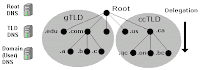
The Domain Name System uses a tree (or hierarchical) name structure. At the top of the tree is the root followed by the Top Level Domains (TLDs) then the domain-name and any number of lower levels each separated with a dot.
NOTE: The root of the tree is represented most of the time as a silent dot ('.')
Top Level Domains (TLDs) are split into two types:
1. Generic Top Level Domains (gTLD) .com, .edu, .net, .org, .mil etc.
2. Country Code Top Level Domain (ccTLD) e.g. .us, .ca, .tv , .uk etc.
Country Code TLDs (ccTLDs) use a standard two letter sequence defined by ISO 3166.
The following figure shows this:
Fig 5.2
What is commonly called a 'Domain Name' is actually a combination of a domain-name and a TLD and is written from LEFT to RIGHT with the lowest level in the hierarchy on the left and the highest level on the right.
domain-name.tld e.g. example.com
In the case of the gTLDs e.g. .com, .net etc. the user part of the delegated name - the name the user registered - is called a Second Level Domain (SLD), it is the second level in the hierarchy. The user part is frequently simply referred to as the SLD. So the Domain name in the example above can be re-defined to consist of:
sld.tld e.g. example.com
The term Second Level Domain (SLD) is much less useful with ccTLDs where the user registered part is frequently the Third Level Domain e.g.:
example.co.in
example.com.br
The term Second Level Domain (SLD) provides technical precision but can be confusing - unless the precision is required we will continue to use the generic term Domain Name or simply Domain to the whole name e.g. a Domain Name is example.com or example.co.in.
Authority and Delegation
The concepts of Delegation and Authority lie at the core of the domain name system hierarchy. The Authority for the root domain lies with Internet Corporation for Assigned Numbers and Names (ICANN). Since 1998 ICANN, a non-profit organisation, has assumed this responsibility from the US government.
The gTLDs are authoritatively administered by ICANN and delegated to a series of accredited registrars. The ccTLDs are delegated to the individual countries for administration purposes. Figure 5.2 above shows how any authority may in turn delegate to lower levels in the hierarchy, in other words it may delegate anything for which it is authoritative. Each layer in the hierarchy may delegate the authoritative control to the next lower level.
Countries with more centralized governments, like India and others, have opted for functional segmentation in their delegation models e.g. .co = company, .ac = academic etc.). Thus mycompany.co.in is the 'Domain Name' of 'mycompany' registered as a company from the UK registration authority.
By reading a domain name from RIGHT to LEFT you can track its delegation. This unit of delegation is usually referred to as a 'zone' in standards documentation.
DNS ORGANISATION AND STRUCTURE
The Internet's DNS exactly maps the 'Domain Name' delegation structure described above. There is a DNS server running at each level in the delegated hierarchy and the responsibility for running the DNS lies with the AUTHORITATIVE control at that level.
Figure 5.3 shows this diagrammatically.
Figure 5.3 DNS mapped to Domain Delegation
The Root Servers (Root DNS) are the responsibility of ICANN but operated by a consortium under a delegation agreement. ICANN created the Root Servers Systems Advisory Committee (RSSAC) to provide advice and guidance as to the operation and development of this critical resource. The IETF was requested by the RSSAC to develop the engineering standards for operation of the Root-Servers. This request resulted in the publication of RFC 2870.
There are currently (mid 2003) 13 root-servers world-wide.
The Root-Servers are known to every public DNS server in the world.
The TLD servers (ccTLD and gTLD) are operated by a variety of agencies and registrars under a fairly complex set of agreements by Registry Operators.
The Authority and therefore the responsibility for the User (or 'Domain Name') DNS servers lie with the owner of the domain. In many cases this responsibility is delegated by the owner of the Domain to an ISP, Web Hosting Company or increasingly a registrar. Many companies, however, elect to run their own DNS servers and even delegate the Authority and responsibility for sub-domain DNS servers to separate parts of the organisation.
When any DNS cannot answer (resolve) a request for a domain name from a host e.g. example.com the query is passed to a root-server which will direct the query to the appropriate TLD DNS server which will in turn direct it to the appropriate Domain (User) DNS server.
DNS QUERIES
The major task carried out by a DNS server is to respond to queries (questions) from a local or remote resolver or other DNS acting on behalf of a resolver. A query would be something like 'what is the IP address of abc.example.com'.
A DNS server may receive such a query for any domain. DNS servers may be configured to be authoritative for some (if any) domains, slaves, caching, forwarding or many other combinations for others.
Most of the queries that a DNS server will receive will be for domains for which it has no knowledge i.e. for which it has no local zone files. The DNS software typically allows the name server to respond in different ways to queries about which it has no knowledge.
There are three types of queries defined for DNS:
1. A recursive query - the complete answer to the question is always returned. DNS servers are not required to support recursive queries.
2. An Iterative (or non-recursive) query - where the complete answer MAY be returned. AllDNS servers must support Iterative queries.
3. An Inverse query - where the user wants to know the domain name given a resource record.
Note: The process called Reverse Mapping (returns a host name given an IP address) does not use Inverse queries but instead uses Recursive and Iterative (non-recursive) queries using the special domain name IN-ADDR.ARPA. Historically reverse IP mapping was not mandatory. Many systems however now use reverse mapping for security and simple authentication schemes so proper implementation and maintenance is now practically essential.
Recursive Queries
A recursive query is one where the DNS server will fully answer the query (or give an error). DNS servers are not required to support recursive queries and either the resolver (or another DNS acting recursively on behalf of another resolver) negotiate use of recursive service using bits in the query headers.
There are three possible responses to a recursive query:
1.The answer to the query accompanied by any CNAME records (aliases) that may be useful. The response will indicate whether the data is authoritative or cached.
2.An error indicating the domain or host does not exist (NXDOMAIN). This response may also contain CNAME records that pointed to the non-existing host.
3.A temporary error indication - e.g. can't access other DNS's due to network error etc.
In a recursive query a DNS server will, on behalf of the client (resolver), chase the trail of DNS across the universe to get the real answer to the question. The journeys of a simple query such as 'what is the IP address of xyz.example.com' to a DNS server which supports recursive queries but is not authoritative for example.com could look something like this:
1.Resolver on a host sends query 'what is the IP address of xyz.example.com' to locally configured DNS server.
2.DNS server looks up xyz.example.com in local tables (its cache) - not found
3.DNS sends query to a root-server for the IP of xyz.example.com
4.The root-server replies with a referral to the TLD servers for .com
5.The DNS server sends query 'what is the IP address xyz.example.com' to .com TLD server.
6.The TLD server replies with a referral to the name servers for example.com
7.The DNS server sends query 'what is the IP address xyz.example.com' to name server for example.com.
8.Zone file defines a CNAME record which shows xyz is aliased to abc. DNS returns both the CNAME and the A record for abc.
9.Send response abc=x.x.x.x (with CNAME record xyz=abc) to original client resolver. Transaction complete.
Iterative (non-recursive) Queries
An Iterative (or non-recursive) query is one where the DNS server may provide a partial answer to the query (or give an error). DNS servers must support non-recursive queries.
There are four possible responses to a non-recursive query:
1.The answer to the query accompanied by any CNAME records (aliases) that may be useful. The response will indicate whether the data is authoritative or cached.
2.An error indicating the domain or host does not exist (NXDOMAIN). This response may also contain CNAME records that pointed to the non-existing host.
3.A temporary error indication - e.g. can't access other DNS's due to network error etc...
4.A referral; the name and IP address (es) or one or more name server(s) that are closer to the requested domain name. This may, or may not be, the authoritative name server for the target domain.
The journeys of a simple query such as 'what is the IP address of xyz.example.com' to a DNS server which supports Iterative (non-recursive) queries but is not authoritative for example.com could look something like this:
1.Resolver on a host sends query 'what is the IP address xyz.example.com' to locally configured DNS server.
2.DNS server looks up xyz.example.com in local tables (its cache) - not found
3.The DNS replies with a referral containing the root-servers
4.Resolver sends query to a root-server for the IP of xyz.example.com
5.The root-server replies with a referral to the TLD servers for .com
6.The Resolver sends query 'what is the IP address xyz.example.com' to .com TLD server.
7.The TLD server replies with a referral to the name servers for example.com
8.The Resolver sends query 'what is the IP address xyz.example.com' to name server for example.com.
9.Zone file defines a CNAME record which shows xyz is aliased to abc. DNS returns both the CNAME and the A record for abc.
10.Transaction complete.
Note: The above sequence is highly artificial since the resolver on Windows a most *nix systems is a stub resolver - which is defined in the standards to be a minimal resolver which cannot follow referrals. If you reconfigure your local PC or Workstation to point to a DNS server that only supports Iterative queries - it will not work.
Inverse Queries
An Inverse query maps a resource record to a domain. An example Inverse query would be 'what is the domain name for this MX record'. Inverse query support is optional and it is permitted for the DNS server to return a response Not Implemented.
Inverse queries are NOT used to find a host name given an IP address. This process is called Reverse Mapping (Look-up) uses recursive and Iterative (non-recursive) queries with the special domain name IN-ADDR.ARPA.
Zone Updates
The initial design of DNS allowed for changes to be propagated using Zone Transfer (AXFR) but the world of the Internet was simpler and more sedate in those days (1987). The desire to speed up the process of zone update propagation while minimizing resources used has resulted in a number of changes to this aspect of DNS design and implementation from simple - but effective - tinkering such as Incremental Zone Transfer (IXFR) and Notify messages to the concept of Dynamic Updates which is still not widely deployed.
Warning While zone transfers are generally essential for the operation of DNS systems they are also a source of threat. A slave DNS can become poisoned if it accepts zone updates from a malicious source. Care should be taken during configuration to ensure that, as a minimum, the 'slave' will only accept transfers from known sources.
Full Zone Update (AXFR)
The original DNS specifications (RFC 1034 & RFC 1035) envisaged that slave (or secondary) DNS servers would 'poll' the 'master'. The time between such 'polling' is determined by the REFRESH value on the domain's SOA Resource Record
The polling process is accomplished by the 'slave' sending a query to the 'master' and requesting the latest SOA record. If the SERIAL number of the record is different from the current one maintained by the 'slave' a zone transfer (AXFR) is requested. This is why it is vital to very disciplined about updating the SOA serial number every time anything changes in ANY of the zone records.
Zone transfers are always
Incremental Zone Update (IXFR)
Transferring very large zone files can take a long time and waste bandwidth and other resources. This is especially wasteful if only a single record has been changed! RFC 1995 introduced Incremental Zone Transfers (IXFR) which as the name suggests allows the 'slave' and 'master' to transfer only those records that have changed.
The process works as for AXFR. The 'slave' sends a query for the domain's SOA Resource Record every REFRESH interval. If the SERIAL value of the SOA record has changed the 'slave' requests a Zone Transfer and indicates whether or not it is capable of accepting an Incremental Transfer (IXFR). If both 'master' and 'slave' support the feature an Incremental Transfer (IXFR) takes place otherwise a Full Zone Transfer (AXFR) takes place. Incremental Zone transfers use TCP on port 53 (normal DNS queries operations use UDP on port 53).
The default mode for BIND when acting as a 'slave' is to use IXFR unless it is configured not to using the request-ixfr parameter in the server or options section of the named.conf file.
The default mode for BIND when acting as a 'master' is to use IXFR only when the zone is dynamic. The use of IXFR is controlled using the provide-ixfr parameter in the server or options section of the named.conf file.
Notify (NOTIFY)
RFC 1912 recommends a REFRESH interval of up to 12 hours on the REFRESH interval of an SOA Resource Record. This means that changes to the 'master' DNS may not be visible at the 'slave' DNS for up to 12 hours. In a dynamic environment this may be unacceptable.
RFC 1996 introduced a scheme whereby the master will send a NOTIFY message to the slaveDNS systems that a change MAY have occurred in the domain records. The 'slave' on receipt of the NOTIFY will request the latest SOA Resource Record and if the SERIAL value is different will attempt a Zone Transfer using either a full Zone Transfer (AXFR) or an Incremental Transfer (IXFR).
NOTIFY behavior in BIND is controlled by notify, also-notify and notify-source parameters in the zone or options statements of the named.conf file.
Dynamic Update
The classic method of updating Zone Resource Records is to manually edit the zone file and then stop and start the name server to propagate the changes. When the volume of changes reaches a certain level this can become operationally unacceptable - especially considering that in organizations which handle large numbers of Zone Files, such as service providers, BIND itself can take a long time to restart at it plows through very large numbers of zone statements.
The 'holy grail' of DNS is to provide a method of dynamically changing the DNS records while DNS continues to service requests.
There are two architectural approaches to solving this problem:
Allow 'run-time' updating of the Zone Records from an external source/application.
Directly feed BIND (say via one of its two APIs) from a database which can be dynamically updated.
RFC 2136 takes the first approach and defines a process where zone records can be updated from an external source. The key limitation in this specification is that a new domain cannot be added dynamically. All other records within an existing zone can be added, changed or deleted. In fact this limitation is also true for both of BIND's APIs as well.
Part of this specification the term Primary Master is coined to describe the Name Server defined in the SOA Resource Record for the zone. The significance of this term is that when dynamically updating records it is essential to update only one server even though there may be multiple master servers for the zone. In order to solve this problem a 'boss' server must be selected, this 'boss' server termed the Primary Master has no special characteristics other than it is defined as the Name Server in the SOA record and may appear in an allow-updateclause to control the update process.
While normally associated with Secure DNS features (TSIG - RFC 2845 & TKEY - RFC 2930) Dynamic DNS (DDNS) does not REQUIRE TSIG/TKEY. However there is a good reason to associate the two specifications when you consider that by enabling Dynamic DNS you are opening up the possibility of master zone file corruption or poisoning. Simple IP address protection (ACL) can be configured into BIND but this provides - at best - limited protection. For that reason serious users of Dynamic DNS will always use TSIG/TKEY procedures to authenticate incoming requests.
Dynamic Updating is defaulted to deny from all hosts. Control of Dynamic Update is provided by the BIND allow-update (usable with and without TSIG/TKEY) and update-policy (only usable with TSIG/TKEY) clauses in the zone or options statements of the named.conf file.
There are a number of Open Source tools which will initiate Dynamic DNS updates these include dnsupdate (not the same as DNSUpdate) and dnsupdate which is distributed withbind-utils.
Alternative Dynamic DNS Approaches
As noted above the major limitation in the standard Dynamic DNS (RFC 2136) approach is that new domains cannot be created dynamically.
BIND-DLZ takes a much more radical approach and using a serious patch to BIND allows replacement of all zone files with a single zone file which defines a database entry. The database support, which includes most of the major databases (MySQL, PostgreSQL, BDB and LDAP among others) allows the addition of new domains as well as changes to pre-existing domains without the need to stop and start BIND. As with all things in life there is a trade-off and performance can drop precipitously. Current work being carried (early 2004) out with a High performance Berkeley DB (BDB) is showing excellent results approaching raw BIND performance.
Posted In
Solaris
|
0
comments
|
Subscribe to:
Posts (Atom)
